Missing DWGs When Attaching in AutoCAD

Missing DWGs When Attaching:

If you are using Windows 11, you may encounter an issue when trying to attach a DWG file. The solution is rather simple, but it is easy to get stuck on.

  1. By Default, the File Type is set to “All Image Files” this means only image files such as JPG, .PNG, etc. will appear.

  2. To see all files, click the File Type dropdown and select “All Files.” You should now see your DWGs, or other files you may want to attach.

  3. Once you do, click the desired DWG and then Open.

  4. It will now be ready to add to AutoCAD
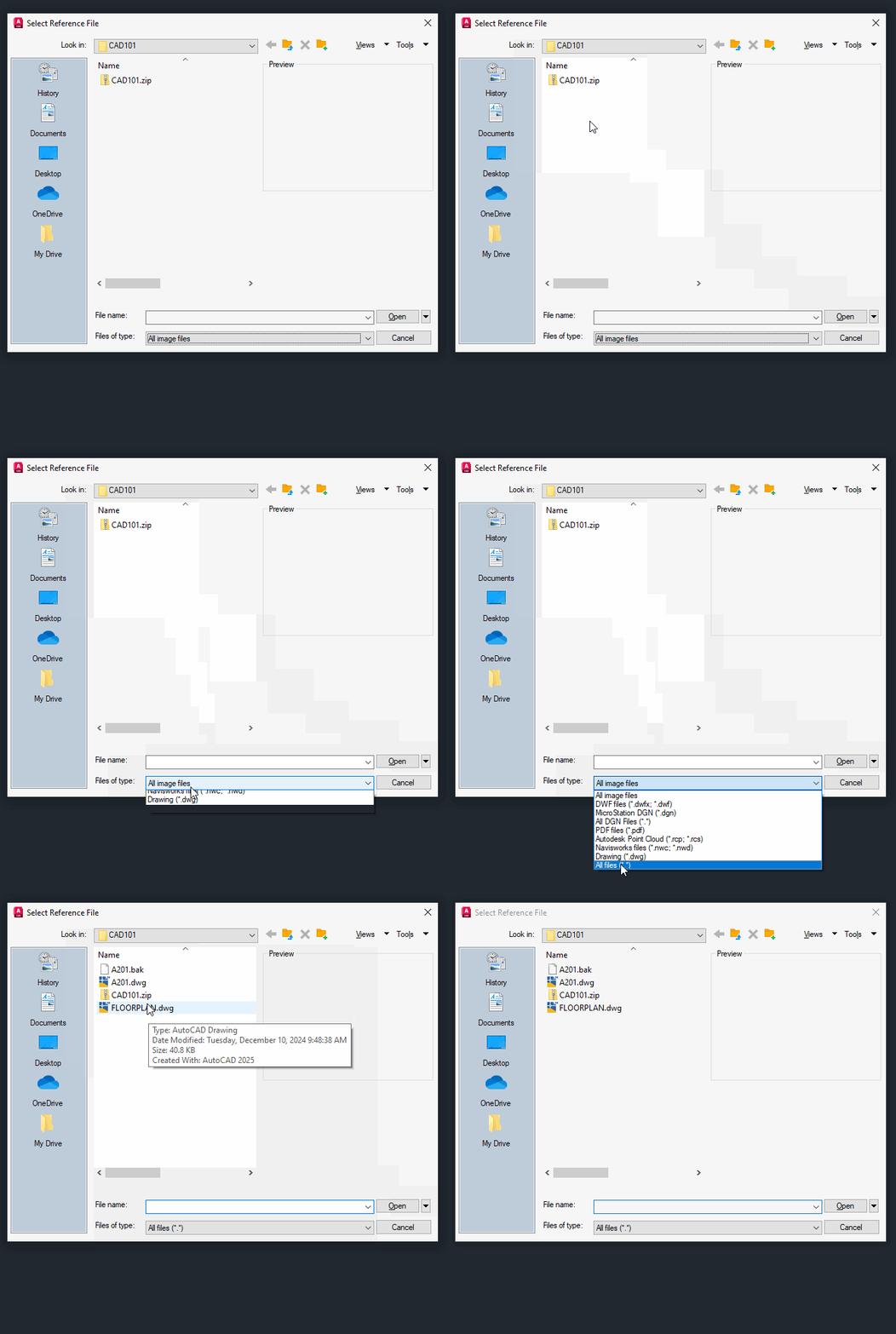
File Type Change

photo of VDCI Editorial Team

VDCI Editorial Team

The VDCI Editorial Team is a collaborative group of professionals from the Virtual Design & Construction Institute, bringing together expertise from Student Services, Academics, and Marketing. Dedicated to providing valuable insights for the AEC community, our team combines industry knowledge with a passion for education to deliver engaging and informative content.

More articles by VDCI Editorial Team
Yelp Facebook LinkedIn YouTube Twitter Instagram